Web analytics that shows what visitors actually do.
Analytics, funnels, scroll heatmaps, SEO rank tracking and webhook alerts in one dashboard. EU-hosted, two-minute install.
What you will keep coming back to
A few of the views you will keep open.
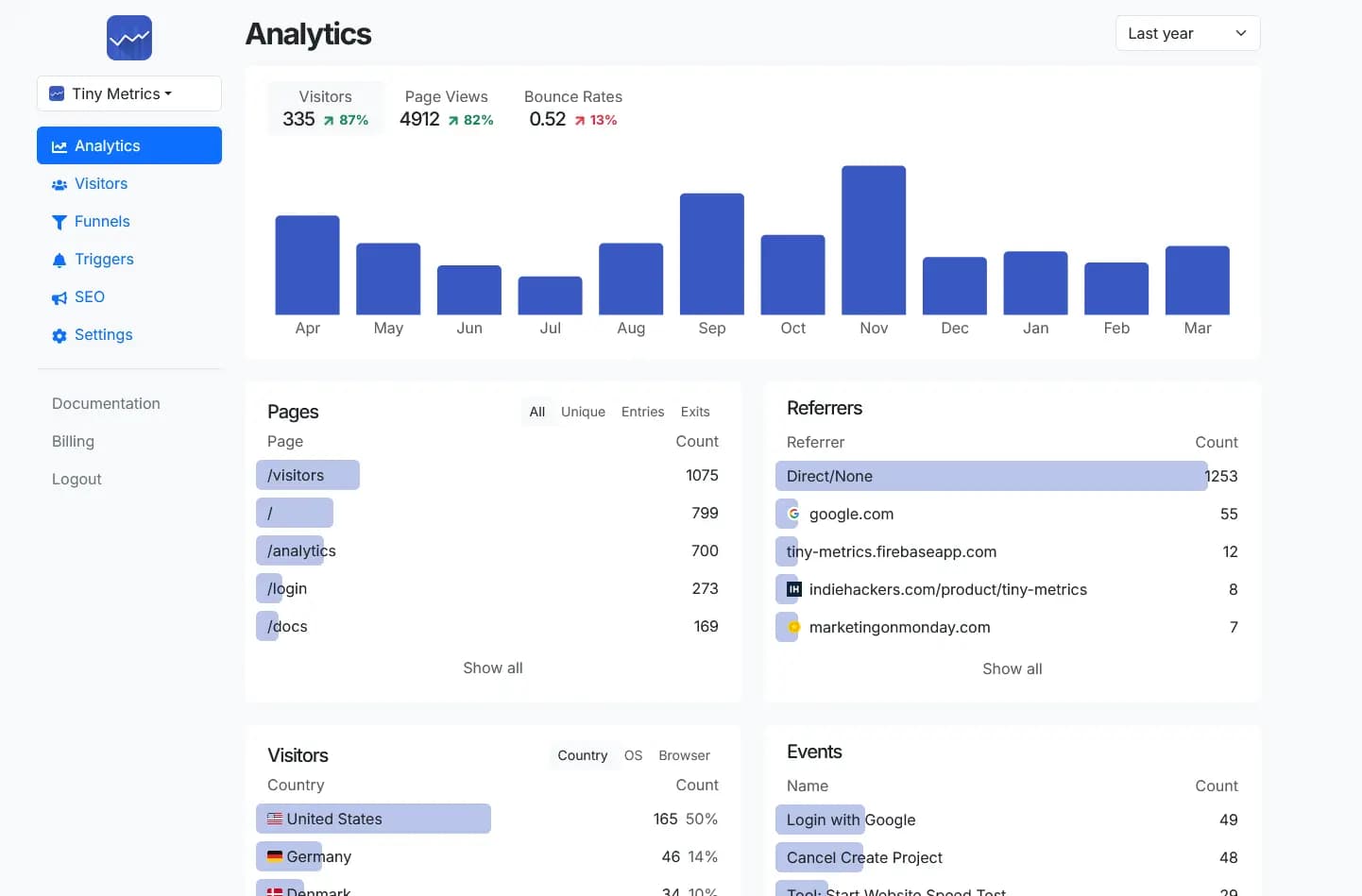
Each panel below runs in the live dashboard, same component, real data. Beyond what's shown: retention cohorts, user flow, SEO rank tracking, segments, email forwarding, and webhook triggers.
See traffic ebb and flow as it happens.
Traffic shown over any window you pick, with peak and average alongside. When a launch lands or a campaign goes out, the spike is right there.
- Spikes stand out, peak and average always visible
- Zoom from yesterday out to a full year
Activity Pulse
When your visitors are most active
Click a visitor, see the whole session.
Every page, scroll and custom event in order. Country, device, browser, referrer and UTM live next to the timeline. No replay video, just the trail of what happened.
- Custom events sit in the timeline alongside page visits
- Country, device, browser, referrer, UTM in one row
- Filter visitors by segment or event property
Visitor
Timeline
Direct / Unknownnow
/
Left /
/pricing
CTA - Pricing Get Started
/register
Find the step that loses customers, automatically.
Build a funnel from any combination of pages and events. When visitors bail at the same step over and over, it surfaces automatically, before you notice the drop in signups.
- Drop-off percentages, step by step
- Repeated drop-offs at the same step flagged automatically
- Filter by segment, source, or device
Pricing → Signup
4,280
318
7%
Stop guessing whether anyone reads below the fold.
We log how far each visitor scrolls and where attention concentrates. The scroll-depth chart tells you, per URL, what fraction made it to the call-to-action, so you can move the things that matter higher up.
- See which pages people actually finish reading
- Time on page per visitor, not a blended average
- Heatmap overlaid on a screenshot of the page itself
Scroll Depth by Page
What it replaces
Stop rebuilding the tools your website needs.
Indie SaaS teams usually choose between paying several vendors or hacking together just enough analytics and email forwarding to get by. Tiny Metrics gives you the useful middle ground: one simple product that covers the common jobs without turning into a project of its own.
Live visitors, sessions, sources, referrers, UTM, country and device breakdowns.
Multi-step funnels with drop-off, stuck detection, retention cohorts and stickiness.
Not a full event warehouse. No SQL or free-form cohort exploration.
Scroll depth per URL plus a heatmap overlaid on a screenshot of the page.
No session recording or replay video.
Daily Google rank for the keywords you watch, with movement over time.
No backlink graph and no full site audit.
DNS setup and forwarding for [email protected] style aliases.
Forwarding only. Not a sending product or full inbox.
Triggers that fire a webhook or post to Discord when an event matches.
Not a general workflow automation platform.
Bonus: a free EU website speed test with no account required.
Install
One script. That is the SDK.
Paste this into <head>. Pageviews, sessions and scroll depth start collecting on the next visitor. No config file, no npm install.
<script defer src="https://tinymetrics.io/tm.js"></script>Custom events take one line:
<button data-tiny-event='Buy'>Buy Now</button>Or fire from JS with properties:
window.tinymetrics.track('Buy', { color: 'red' })Works anywhere you can edit <head>: Next.js, Astro, Nuxt, plain HTML, WordPress, Webflow. Installation guide →
Pricing
Nine dollars a month for the whole stack.
- 100,000 events / month
- Unlimited websites
- Unlimited data retention
- 5 team members
- 100 SEO keywords tracked daily
- Custom-domain email forwarding
- Triggers, webhooks and Discord alerts
- Every feature in the index above
Questions people actually ask
If yours is not below, email [email protected]. A human replies, usually the same day.
defer attribute, so it does not block rendering of the page.document.cookie for tracking. A small visitor identifier is kept inlocalStorageon the visitor's own browser, and a session identifier in sessionStorage. Whether that means you can skip a consent banner depends on your jurisdiction and your other tooling, so check with your own legal counsel.data-tiny-event='Buy' to any element, or call window.tinymetrics.track('Buy', { color: 'red' }) from JS. Extra HTML attributes prefixed with data-tiny-event- become event properties.Two minutes to install.
Paste a script tag, see the next visitor in real time.
Analytics without the compromise
Tiny Metrics is a privacy-first Google Analytics alternative, EU-hosted, built for teams that care what their site does to the people who visit it. One script tag, one paid plan, every feature included from day one.
You get real-time sessions with per-visitor timelines, scroll heatmaps and depth, conversion funnels with stuck detection, retention cohorts, user-flow Sankeys, segments and saved filters, UTM and referrer breakdowns, custom events with searchable properties, SEO keyword rank tracking, webhooks and Discord triggers, custom-domain email forwarding, and a multi-project overview that fits on one screen.
No SDK to wrestle with, no quarterly migration when the vendor renames a metric. Drop in <script defer src="https://tinymetrics.io/tm.js"></script> and the next visitor shows up in the dashboard.